

There is a lot of uneasiness as well as interest in how secure AI is. Many organisations are trying to understand if it is a risk. And many staff are taking on the fear themselves even if it is actually something the cyber team should focus on. But, many staff are not considering security of their data and using all sorts of AI solutions that are indeed a risk.
A very common tool coming to most organisations in Microsoft 365 Copilot. This article will help you understand how it is secure, and what the little nuances are that may trigger your cyber team. It goes into some detail but will help you understand more about how Microsoft provides services to you, which isn’t a bad idea as you use them daily.
TL; DR
- It’s secure.
- Your organisational data remains within your tenant, and the Copilot prompt itself, which is enhanced with some of your data, is sent to an Azure AI service (not the Open AI company or ChatGPT!), which is inside the Microsoft 365 service boundary. This means it stays within your M365 service isolated from other customers and is subject to Microsoft security and compliance commitments and is not used to train the model.
- Copilot Studio Agents use services in different regions as needed.
- It is possible to use external services such as Claude but these are not within your Microsoft 365 Service Boundary and may be against your policies for where data is sent.
- Controls for eDiscovery, over sharing and other facilities provide governance not available via external AI services.
- You can control if Copilot agents can search the Internet and if Copilot agents can use Microsoft services not in your geographic region, although sometimes this is needed for Australia (read on).
- You can control what is sent with the prompt by not making it available through access controls.
- Data has a potential to leave your region if you don’t have Azure Open AI in your region and you want to use it, but only under strict compliance controls and subject to enabling Advanced Data Residency, and with admin consent. This does include Australia but this is changing by end 2025 when Microsoft has committed to process Copilot within Australia.
- Prompts are encrypted in transit.
- Prompt data can in fact be stored securely for 30 days to monitor for abusive text, and subject to eDiscovery and audit policies in your tenancy. These are still not used to train the model or shared.
- There are different types of Copilot in different Microsoft tools, and where they process data can differ. This article focuses on Microsoft 365 Copilot which does not allow your data to be shared and keeps it secure.
The key facts are summarised in table 1 and then discussed in detail below.
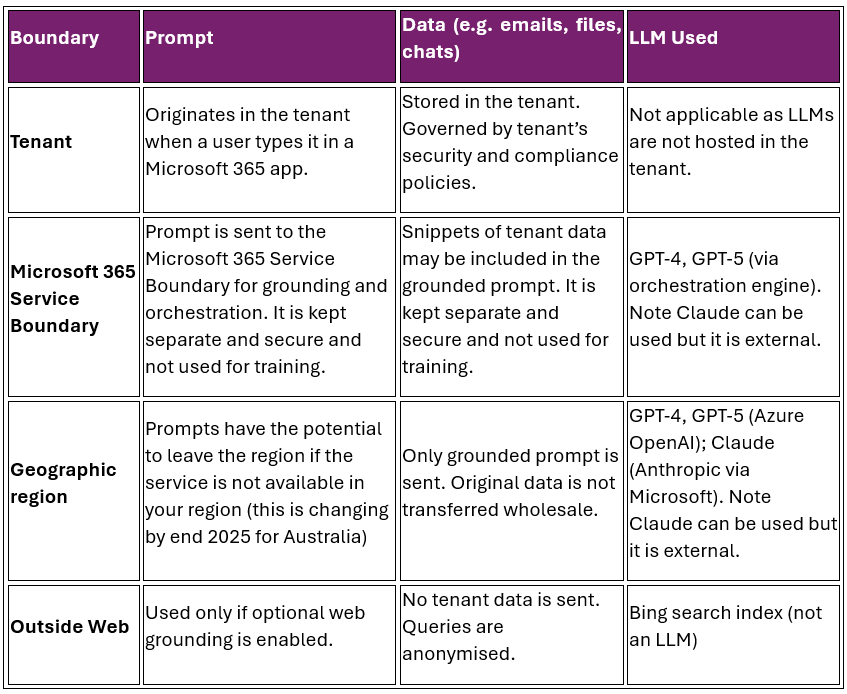
Tenants, service boundaries and regions: why you need to know about them
It is often claimed that when you enter data into Microsoft 365 Copilot the data stays in your tenant. The reason this is said is because most Project Management Office and project management professionals we deal with understand the tenant and trust that Microsoft ensures their data is safe (it is). But this is actually an over simplification. The reason this explanation is simplified to only discuss the tenant is that it is a simpler way to describe the logical separation and security provided by Microsoft. But there is more to it which we will discuss here. Read on if you want to know more about how Microsoft technically does it. Else be assured that your data is protected by Microsoft when you use Microsoft Copilot 365, and is not shared with others or the internet or used to train models where it could potentially pop up elsewhere. This is in contrast to many other typically free AI services.
The key point still remains which is: your data is secure with Copilot. It is not shared. If you currently trust your data with Microsoft in the cloud such as in Microsoft 365 and Outlook and Teams etc. then Copilot is not doing anything different. You can continue to trust your Copilot data and prompts with Microsoft.
What is the tenant? Is that all there is?
What is this tenant that is always spoken about though? Your tenant is your organisation’s dedicated, logically isolated environment in Microsoft 365. Think of your tenant as your digital house. It contains all of your services such as Outlook and Teams. It has an address to identify it like yourcompany.com. It contains administrative and security functions so that you can govern it according to your own rules and control access.
Everything you do such as emails, documents, chats and Copilot prompts stays in this tenant unless you explicitly allow it to be shared externally. But there is a nuance to this, so read on.
The services in the tenant such as Outlook or Copilot are provided by a deeper Microsoft layer. This is the Microsoft infrastructure that hosts and processes your tenant’s data. This is within what is called the Service Boundary.
The Service Boundary includes the underlying secure Microsoft services such as Exchange Online, SharePoint Online and the Copilot orchestration engine (the part of Copilot that provides the “brain” that sits between a user’s natural language prompt and the AI-generated response. It determines how Microsoft 365 Copilot interprets your request, selects the appropriate skill or action, and delivers a relevant, secure, and compliant output)
The service boundary is not a free for all open area. The service boundary ensures that prompts are not shared across tenants, and are not used to train the AI models, and are not sent to public servers. This means that to process the prompt it does need to leave the tenant and go deeper into the underlying service but that deeper layer then ensures that it is kept separate, and goes back to the tenant it came from. The data such as that in your SharePoint may be used by Copilot but it is not sent outside of the tenant.
Think of it like this. Microsoft does not build a data centre with standalone servers for each organisation. There is a deeper shared services but it has controls in place to ensure that nothing is mixed up. You already use this deeper layer for all of your Microsoft tools and services and you have already established that it is secure. Copilot is just more of the same.
Key take away: Your data is not mixed with other organisations data.
If there is a tenant which is your data house, and there is a service boundary which is the underlying infrastructure or services Microsoft provides, why is it called a boundary and what is outside of the boundary?
Anything not part of Microsoft 365’s secure infrastructure is outside of the service boundary. This includes the public internet, Chat GPT, third party apps, external data storage and personal non compliant devices.
There are multiple service boundaries in Microsoft. They are used for specific services such as those provided to the government; to provide specific compliance needs etc. Some organisations want to use Microsoft tools but need very specific controls in place such as the government so they are in their own service boundary.
Key take away: Microsoft Copilot ensures that your data never leaves the M365 Service Boundary. It stays securely with Microsoft and is isolated from that of other organisations.
Prompts versus Data
When organisations worry about the content being put into Copilot ending up in the wrong place they worry generally. But they need to consider the difference between prompts, which you type into Copilot, and the data in your current SharePoint, Teams and Microsoft Graph.
First, we need to consider what a prompt is. A prompt is what you type in natural language into Copilot. For example, “create a mitigation for the risk that rain may impact road construction work”.
Prompts do get sent outside of your tenant into the Copilot service within the service boundary (by grounding them in your organisational data, then sending it to Azure in the Microsoft service boundary, then returning the result to you). Which means that they are kept separate from anyone else’s. And the main point is that Microsoft does not use your prompt to train the model, therefore it is secure. The prompts are not kept. Prompts are encrypted as is all of your other data currently. And they are governed by Microsoft’s compliance commitments, which your cyber team would already be familiar with.
Second, to answer your prompted question data may be needed that is already in your organisation. To extend our example above, you may have standard risk mitigation approaches as part of a risk standard or template or you may have mitigations in your risk register from past projects. Data is your project data, emails, documents, chats, meetings etc. that Copilot uses to respond to the prompts.
The source data stays in your tenant (but read on as to what is sent to the service boundary). Copilot accesses it via the Microsoft Graph but it is not moved out of your tenant. This is the most important question the cyber team typically has.
Copilot adds to the prompt using some of your relevant data, creating a better prompt which is “grounded” in your data, and sends that to the Orchestration Engine which works out which model to use and how to deal with it. So, in this case a blend of your data is leaving the tenant. But it is only sent to the AI model (Azure Open AI, not the Open AI company you see with ChatGPT) in the service boundary. And it is not used to train the model. It is governed by strict compliance rules. Note that Copilot can also use external AI services such as Claude, which do then send your prompt outside of Microsoft. But these need to be explicitly allowed for.
Key take away: your data is not used to train the AI model, and is kept separate by Microsoft from everyone else’s. This is the basis of how we can trust the Microsoft cloud.
Can I stop my data being included in (grounding) the prompt?
Your data is used to provide context to the prompt. But it is the data the user has access to. It is not all organisational data. Through the use of access controls you can prevent sensitive data being available to be included in the prompt, but it means that user can’t see the data anyway.
If you don’t want to use access control you can classify data as sensitive using Microsoft Purview which will then prevent it being included in the prompt.
Key take away: it is possible to prevent data being included in the prompt.
Is there a way for data to be processed outside of my region?
A key constraint by many organisations especially government and large corporations is that data is kept in a specific geographic region. The Microsoft cloud is divided into geographic regions. This relates to sovereign security over data and is important in the ever changing world.
A question often asked is, can the Copilot data leave the region? This does not happen unless you opt in to allow it, and the reason you would do that is because the Microsoft service you want such as Azure Open AI isn’t available in your region. But you need to opt in, else you can’t use the service.
What does this mean for us in Australia? Microsoft 365 Copilot currently processes some Copilot interactions outside of the Australian geographic region, but still within the Microsoft service boundary. It depends on which parts of Copilot are being referred to. If you turn off the ability to process data in another region the following will work:
- Copilot features that are supported in-region (e.g. basic Microsoft 365 Copilot functions that don’t require Azure OpenAI endpoints outside Australia).
- Data at rest (e.g. semantic index, user content) will remain in your tenant’s region if you have Advanced Data Residency (ADR) enabled.
Up until the end of 2025, what may not work is:
- Copilot features that rely on Azure OpenAI endpoints not available in Australia will be disabled unless you opt in to cross-region processing. This includes generative AI features, Copilot Studio agents, and Copilot in Fabric or CRM if hosted outside Australia.
But this is changing. By end 2025 Microsoft has committed to process Copilot data in Australia. Therefore, prompts and responses will be processed in Australian data centres if you have Advanced Data Residency enabled and have opted in for local data residency. This enhances data sovereignty, latency, and compliance for government and regulated industries. It aligns with Australia’s Advanced Data Residency (ADR) commitments and the ASD Blueprint for secure cloud configuration. You can read about this here: Microsoft offers in-country data processing to 15 countries to strengthen sovereign controls for Microsoft 365 Copilot | Microsoft 365 Blog
Key take away: data only leaves your region if you opt in to allow it, and that is only done if you don’t have an Azure Open AI end point in your region. Which means Australia. But this will be changed by Microsoft by end 2025.
Ready to strengthen your organisation’s approach to secure AI?
If you’d like expert guidance on Microsoft 365 Copilot, data governance, or ensuring your AI adoption aligns with security and compliance best practice, Sensei is here to help.
Get in touch with us to discuss your needs and plan your next steps.